In a three-minute video posted on X on November 24, Nan Ha says the game took 3 days. The first version was built with Claude Opus 5.5 and then reworked with Claude Fable 5.2; all 16 commits in the public repo, made November 16 to 21, credit Fable 5.2 as co-author. The characters and their motions come from PINOC, and the developer's post credits them to Viggle's JST-2 world model.
Maple Run
- Web browser
Summary
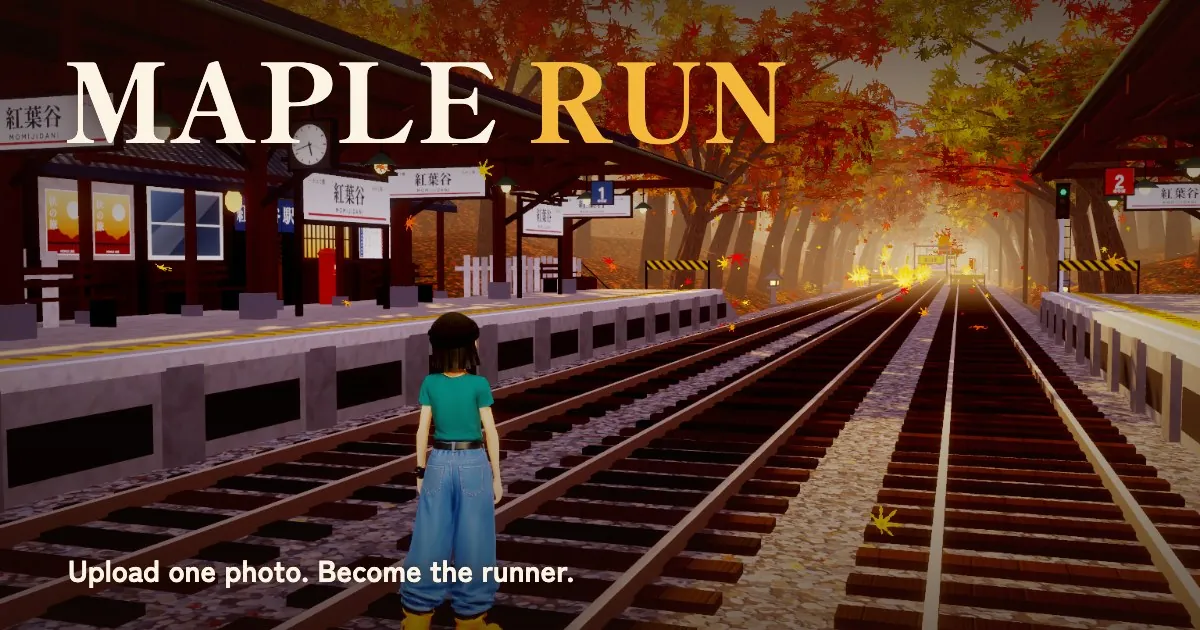
Maple Run is a free browser endless runner by Nan Ha: you switch between three railway tracks, jump barriers and roll under gates while a station master chases you through maple forests, rice paddies, a timber station and a red truss bridge. Every runner is a rigged 3D Gaussian-splat character made with Viggle's PINOC, and a "YOU" card on the title screen turns one uploaded image into a playable runner. Nan Ha announced it on X on November 24, 2026 (UTC), with the code on GitHub; neither the post nor the repo gives a separate launch date. The game needs WebGPU, so the README lists desktop Chrome or Edge and Safari 26 or later. AIGamer loaded the game and started a run on November 25.
Gameplay
How it was made
Step 1 Start from one sentence
Nan Ha says the game began with a single prompt: a Subway Surfers-style game using PINOC's Gaussian characters and motions, set in the Japanese countryside in maple season. Because a well-known runner served as the template, the rules took little design work: three tracks, plus lane switches, jumps and rolls to get past trains.
The one-sentence prompt being typed over a blurred shot of the railway Clip: Nan Ha (@nan_in_space) on X Step 2 Write the world in code
Claude wrote the four landscapes (a maple tunnel, rice paddies, a wooden station and a red bridge) as code instead of 3D files, and the music is generated in code too. The only model is the train car, which the developer says Claude built in Blender; ASSETS.md says it was modeled with a Blender script.
The game's four landscapes in turn: a maple tunnel, rice paddies, a wooden station and a red bridge Clip: Nan Ha (@nan_in_space) on X Step 3 Turn one image into a rigged character
PINOC turns a single character image into a rigged, animatable Gaussian-splat character, which the developer contrasts with the usual model, texture and rig steps across separate tools. Nan Ha uploaded one image per runner and says each came out already rigged and close to the source image.
A character image next to the same character standing on the station platform Clip: Nan Ha (@nan_in_space) on X Step 4 Generate motions through the PINOC MCP
Some motion clips come from PINOC's free motion library. For the rest, the developer had Claude connect to the PINOC MCP server and generate moves from text, such as dodging and falling; ASSETS.md marks those clips with a gen_ prefix.
PINOC's free motion library applying a motion to a character Clip: Nan Ha (@nan_in_space) on X Step 5 Polish over a few iterations
In the last pass, Claude fixed the lighting on the characters, added power-ups and gave each kind of crash its own motion. The repo's November 21 commits include several character-lighting changes.
The station master closing in on a runner after a crash at a barrier Clip: Nan Ha (@nan_in_space) on X Step 6 Let players bring their own runner
The YOU card on the title screen opens a "Run as anyone" panel that takes one character image and the player's own Viggle API key. According to the README, the browser sends the image to the Viggle API, waits a few minutes for the character, then downloads it and stores it locally. Nan Ha's launch video shows an uploaded image becoming a runner.
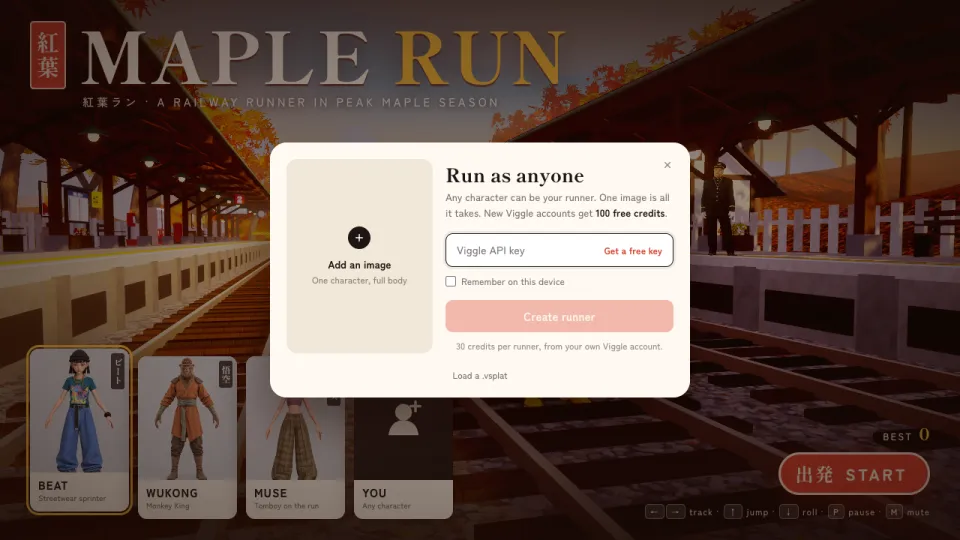
The game's Run as anyone panel, with a space for one character image, a Viggle API key field and a Create runner button Image: AIGamer (screenshot)
Disclosure: Nan Ha's X bio lists a go-to-market and growth role at Viggle ("GTM & Growth @ViggleAI"), the company behind PINOC and JST-2, so the game also works as a showcase for the developer's employer.
The three prebuilt runners are free. A custom runner costs 30 Viggle credits ($0.30), charged to the player's own Viggle API key, and new Viggle accounts start with 100 free credits, according to the README. There's no server: the key stays in the browser, and the finished character is saved there so it's only paid for once.
The license is mixed. The code is MIT, but the project's ASSETS.md says the characters, portraits and motion clips are not, and asks people not to reuse them outside the game. For more on the model behind the characters, see our Viggle JST-2 tool page (https://www.aigamer.gg/tools/viggle-jst-2).
Caveat: the 3-day build time is the developer's claim. The public commit history only covers November 16 to 21, and AIGamer couldn't find the earlier Opus 5.5 version. AIGamer didn't try the paid photo upload.
Sources
Details come from the developer's own posts and pages credited below.
- Nan Ha (@nan_in_space) on X: Here's how I made Maple Run in 3 days (video)
- Nan Ha (@nan_in_space) on X: I rebuilt my game Maple Run with Claude Fable 5.2 (launch video)
- Nan Ha (@nan_in_space) on X: Play and code links (thread reply)
- Nan Ha (@nan_in_space) on X: X profile and bio
- Maple Run (GitHub): README
- Maple Run (GitHub): ASSETS.md
- Maple Run (GitHub): Commit history
- Maple Run: Play Maple Run
- Viggle: PINOC
- AIGamer: Viggle JST-2
Image: Nan Ha (Maple Run share image)
Written in our own words; quotes are marked and credited. How we report