SpriteCast
Isometric sprites and walk cycles guided by 3D models
- Best for
- 2D and isometric game developers using Claude Code who need consistent 8-direction character walks and props at a fixed camera angle
- Makes
- Sprite strips, props, shadows and anchor data, with export files for Godot, Unity, Phaser and Aseprite
- Made by
- Sunghwan Baek
- Where you use it
- CLI, Windows, macOS, Linux
- Engines
- Godot, Unity, Phaser, Any engine
- Pricing
- Free and open source (MIT); drawing is billed by OpenAI to your own API key and walking characters use Tripo API credits (as of November 2026)
- Free plan
- Yes
- Open source
- Yes (MIT)
- Export
- export.py writes ready-made folders for Godot 4, Unity, Phaser 3 and Aseprite; any engine that takes PNGs can use the sprites with the anchor data in JSON. Pixel-art sets are not exported to engines yet, and the README says the output belongs to the user
- Status
- Available
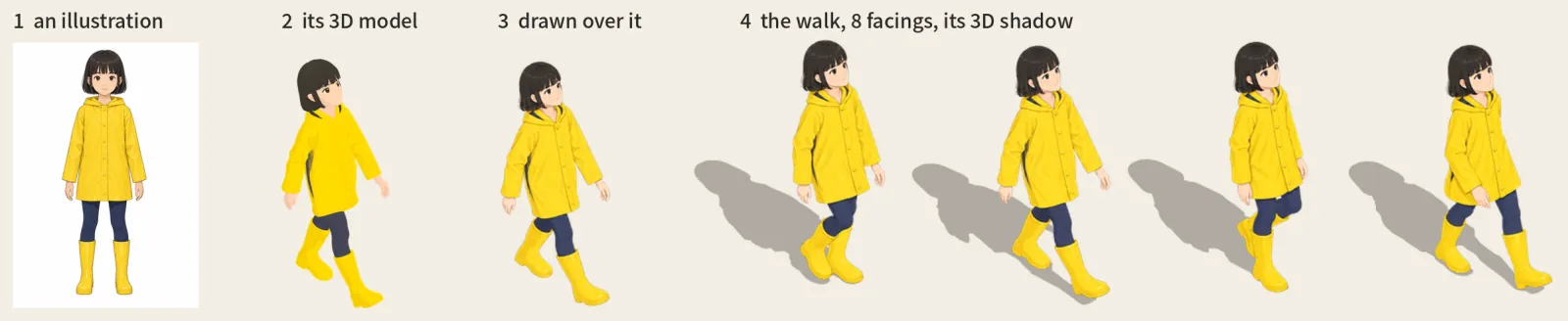
SpriteCast is a free, MIT-licensed plugin for Claude Code, made by developer Sunghwan Baek, that produces game sprites at a game's own camera angle and scale. Its README describes the core idea as letting 3D handle the motion while an image model only repaints each frame, so a character keeps the same body and pose from frame to frame.
For a walking character, the plugin draws a turnaround from one illustration, has Tripo build and rig a 3D model, renders the walk from the game's camera with a shadow per frame, and then has an OpenAI image model redraw the renders in the illustration's style. The result is a walk in eight facings plus standing views. It also makes props from a text description, extra actions such as run, jump or any Mixamo clip, four-legged animals, sitting poses and pixel art about 100 px tall. A free command writes files for Godot 4, Unity, Phaser 3 and Aseprite.
The plugin costs nothing, but the paid steps run on your own API keys. According to the README, a prop costs about $0.07 in OpenAI drawing and a walking character about $2.2 plus 75 Tripo credits, and each paid step shows its price and waits for approval.
It suits developers of isometric and top-down 2D games who already use Claude Code. The project was renamed from iso-sprite in early November 2026 and was updating several times a week when checked on November 19, 2026. AIGamer has not tested it.
Limitation: Walking characters must start from an illustration that faces front and stands straight, and the README warns its automatic outline check can't catch problems like a head turned the wrong way
FAQ
Is SpriteCast free?
The plugin is free and MIT-licensed, but drawing uses your own OpenAI API key and walking characters need Tripo API credits. The README estimates about $0.07 per prop and about $2.2 plus 75 Tripo credits per walking character, and it says no money goes to the author.
Is SpriteCast the same as spritecast.com?
No. This SpriteCast is an open-source Claude Code plugin on GitHub by Sunghwan Baek. The Sprite Cast desktop app sold at spritecast.com is a different product.
Which game engines does SpriteCast work with?
Its export command writes ready-made files for Godot 4, Unity, Phaser 3 and Aseprite. Any engine that takes PNG images can use the sprites with the anchor and shadow data in the JSON files, per the README.
How do I install SpriteCast?
In a terminal, run claude plugin marketplace add Sunghwan0112/spritecast, then claude plugin install spritecast@spritecast. It also needs Python 3.9 or newer and Chrome or Edge, and Claude runs a setup check that installs the rest.
Sources
Compiled by AIGamer from SpriteCast's own pages and the sources below, checked 19 November 2026. We haven't tested SpriteCast hands-on.
- SpriteCast: README (GitHub)
- SpriteCast: Changelog (GitHub)
- SpriteCast: Plugin manifest (plugin.json)
- SpriteCast: Korean README
- GitHub: Repository metadata (API)
- Sprite Cast: Home page (unrelated desktop app)
Image: Sunghwan Baek / SpriteCast
Written in our own words; quotes are marked and credited. How we report