Guide
How to use AI in Roblox: Studio Assistant, MCP and AI game makers (2026)
Roblox Studio has its own AI agent, a built-in MCP server for Claude Code and Cursor, and a prompt-to-game tool in alpha. What each does, how to turn it on, and the rules for AI in your game.
Key points
- To open Roblox's AI in Studio, click Assistant on the right side of the mezzanine bar; you can add your own Anthropic, OpenAI or Google API key under Manage API Keys.
- To use Claude Code, Cursor or Codex, turn on Studio's built-in MCP server in Assistant's menu under Manage MCP Servers; Roblox's old GitHub server was archived in April 2026.
- If players talk to AI in your game, Roblox requires an on-screen AI notice and a declaration in the maturity questionnaire, and ongoing chatbot-style AI makes a game 18+.
Roblox builds more AI into its editor than most engines. Roblox Studio comes with Assistant, an AI agent that can write scripts, build and edit objects, generate 3D models and playtest your game. Studio can also act as an MCP server, so outside agents such as Claude Code, Cursor and Codex can work inside it. And Roblox is testing Build, a tab in the Roblox mobile app that turns a prompt into a starting point for a game, in four countries.
Creators are using it. In its Q3 2026 shareholder letter, Roblox said that "more than 80% of the top 100 games on Roblox (ranked by hours engaged) used AI tools to accelerate creation" in the past month, and that several games built almost entirely through its Studio MCP connector had reached the top 20 by concurrent users (our story).
This guide covers what each tool does, how to turn it on, which outside tools are worth a look, and Roblox's rules for AI inside a game. Everything is as of November 7, 2026.
Roblox Studio Assistant: the built-in AI
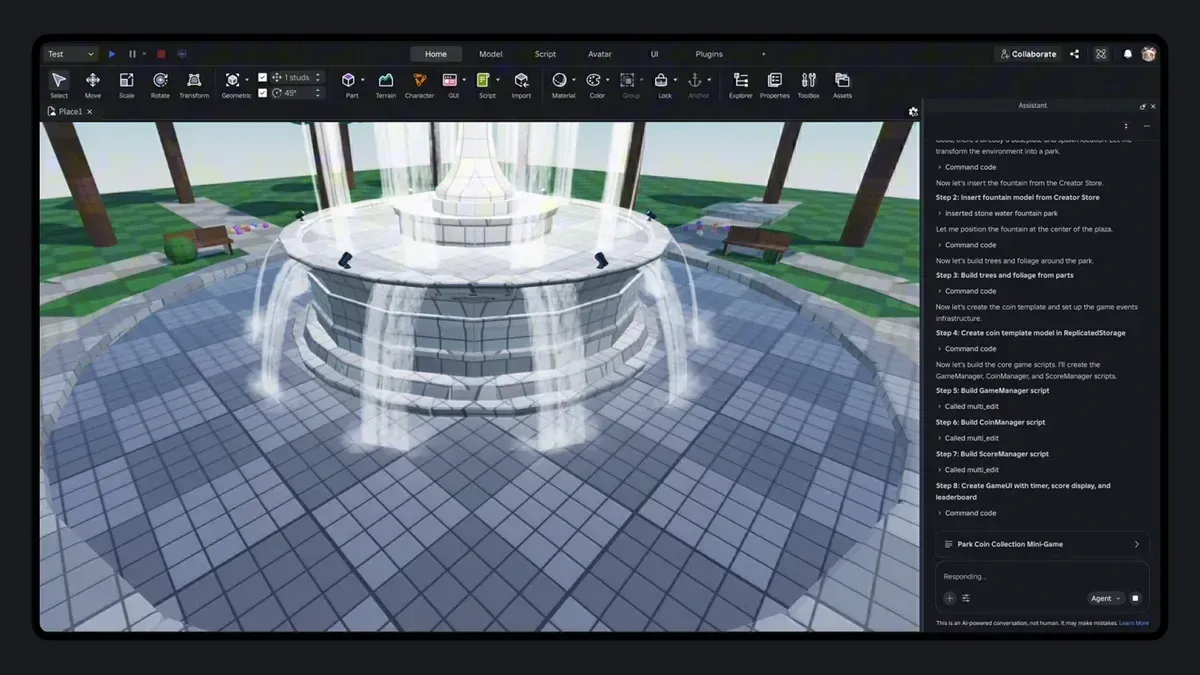
Assistant is a language model connected to a system that runs commands in your place. According to Roblox's Assistant guide, it can create, change and delete objects, insert or edit scripts across many objects at once, make bulk property changes, and answer questions about your code. It can also:
- insert assets from the Creator Store or your inventory, showing you options before it places anything;
- generate materials, textured meshes and procedural models (with slash commands such as
/generate_mesh); - split a mesh into parts with
/segment_mesh; - capture the viewport in Edit and Play modes, so it can see what it built.
How to open it: in Studio, click Assistant on the right side of the mezzanine bar (the strip at the top of Studio that holds the Home and Model tabs), then type what you want in the Assistant window. You can keep several chats per place; they're saved to the cloud.
Planning Mode. Announced on April 16, 2026, it makes Assistant show its steps before it does anything. Pick "plan" in Assistant's dropdown or type /plan; you can edit, reorder or delete steps, and nothing runs until you click Build. Each session saves checkpoints you can go back to.
Playtest agent (beta). Turn it on under File > Beta Features > Playtest Agent, then ask Assistant to use it. It controls a test character and reports Pass, Fail, Inconclusive or Error. Roblox's beta post says it can report false passes, so treat a "Pass" as a hint, not proof.
Use your own model. Since February 2026 you can connect your own API key from Anthropic, OpenAI or Google. Click the three dots at the top right of Assistant, choose Manage API Keys, paste the key, then pick a model from the Model dropdown. Roblox says the key is stored on your device. Roblox doesn't name the models Assistant uses by default; its shareholder letter says Assistant can "route prompts to a range of models."
Limits. Roblox's guide lists caps such as 50 procedural models per rolling 24 hours and 8 parts per generated model. Roblox doesn't publish a price for Assistant or its overall daily usage cap, which some creators on the DevForum have asked Roblox to raise (the playtest agent has its own daily cap). With your own API key, your AI provider bills you for usage.
How to connect Claude Code, Cursor or Codex (Roblox MCP)
If you'd rather work with a coding agent you already use, Studio has a built-in MCP server (MCP, the Model Context Protocol, lets an agent call another program's functions). According to Roblox's MCP docs:
- Open Assistant, click the … menu and choose Manage MCP Servers.
- Turn on Enable Studio as MCP server.
- Use quick connect in Assistant Settings > MCP Servers to set up Claude Code, Claude Desktop, Codex CLI, Cursor, Gemini CLI, VS Code or Antigravity. For manual setup, the docs give the server path for macOS (
/Applications/RobloxStudio.app/Contents/MacOS/StudioMCP) and Windows (cmd.exe /c %LOCALAPPDATA%\Roblox\mcp.bat).
The server runs on your machine and gives the agent tools in several groups: reading, searching and editing scripts; generating meshes and materials; inserting assets; exploring the place; running Luau code; starting and stopping a playtest, reading console output and taking screenshots; and sending keyboard, mouse and movement input to a test character. It also includes the playtest agent. Roblox's docs warn that "MCP clients can read and modify content in your open Roblox places," so only connect agents you trust, and save a copy of your place first.
Ignore older setup guides that point to GitHub. Roblox's original open-source server, studio-rust-mcp-server, was archived on April 3, 2026, and Roblox now points to the built-in one. The best-known community server, boshyxd's robloxstudio-mcp, was archived in June 2026; its owner points to a maintained fork, Chrrxs/robloxstudio-mcp (MIT), which adds multiplayer testing and running Luau on both server and client.
To give an agent Roblox know-how, the built-in server has a skill tool that returns Roblox guidance, and Roblox Skills (MIT) is a set of Claude Code skills for planning and building Roblox games. Our guide to engine skill packs for coding agents explains how skills work.
Coding Roblox in VS Code or Cursor
You don't need MCP to let an AI edit your Luau scripts. Studio's Script Sync syncs scripts to a folder on your computer and back: select folders in the Explorer, right-click, choose "Sync to…" and pick a folder. Roblox's docs name VS Code and Cursor among the editors that work with it. It only syncs scripts and folders (up to 10,000 scripts per top-level synced folder), and scripts with attributes or tags can lose data.
For a whole project under version control, Roblox's docs say third-party tools such as Rojo are "a better choice." Rojo (MPL-2.0) runs a local server that syncs your files into Studio through a plugin. Roblox lists it alongside luau-lsp, selene and StyLua on its third-party tools page, but notes these aren't maintained by Roblox and the list "shouldn't be taken as a strict recommendation."
Other AI tools built into Roblox
Roblox's "AI on Roblox" overview lists more features for creators:
- Code Assist: code suggestions as you type in the script editor.
- Material Generator: creates tiling materials from a text prompt (Window > 3D > Material Generator).
- Texture Generator: textures a mesh from text or an image. Its fast mode makes a 1K texture in under 30 seconds; its quality mode makes a 4K PBR texture in a couple of minutes. Select a mesh, then Model tab > Texture.
- Avatar Auto-Setup: rigs and prepares a 3D model as an animated avatar.
Behind some of this is Cube, Roblox's own 3D generation model, which Roblox has released as open source on GitHub with model weights on Hugging Face.
Some AI also works inside a running game. GenerationService lets a game generate 3D meshes and multi-part models from text or an image while people play, for example a drivable car, using Cube 3D. TextGenerator gives NPCs a language model for dialogue, starting at 100 requests a minute and scaling with players. There are also text-to-speech and speech-to-text APIs. Check the rules below before adding any of these.
AI Roblox game makers: Build and third-party tools
Roblox Build is Roblox's own prompt-to-game tool: a tab in the Roblox app, made for phones, that Roblox says will "automatically generate a starting point for the creator to iterate on." Its docs say it currently focuses on 2D and 2.5D games. It launched as a public alpha in New Zealand on July 28, 2026, and by Roblox's Q3 letter was also open in Singapore, Serbia and Thailand. Roblox said more than 500,000 people had used it and published over 70,000 games, that a free base tier will stay with paid options for more prompts (bought with Robux), and that it plans to roll Build out "more broadly later this year." Roblox hasn't named the US among its countries so far.
Outside Roblox, several companies sell AI tools that build Roblox games or work inside Studio. Prices are from their own pages on November 7, 2026, and the claims are theirs; AIGamer hasn't tested them.
| Tool | What it does | Price |
|---|---|---|
| Ropilot | An agent that reads, edits and tests inside Studio | Free (500 actions a month) with your own AI subscription; paid plans from $20 a month |
| Rebirth | Writes and runs Lua, builds worlds and playtests inside Studio | 5 free credits; from $8.99 a month |
| RoCode | A web chat plus a Studio plugin | Free Starter plan; from $9.99 a month |
| studs.gg | Builds, playtests and publishes a game to your account, or gives you a .rbxl file | First build free; Pro prices not shown |
Some of these sites show user numbers that don't match from one part of the page to another, so treat marketing figures with care. RoCode's own page says it can't build "a finished, balanced game from one sentence," and Roblox's Assistant works the same way: it plans and builds in steps that you review. For prompt-to-game tools beyond Roblox, see our best AI game makers guide.
Roblox's rules for AI in your game
Using AI to make your game needs no special permission. AI that players interact with does. Roblox's "Games with generative AI" page says:
- You may use third-party AI, but "you are responsible for the content delivered to users, even if it is AI-generated." Roblox moderates its own AI APIs; outside AI must still meet the Community Standards and not get around Roblox's safety systems.
- You must declare AI interactions in the Content Maturity questionnaire.
- Players must see a notice that they're talking to AI, at the start of each interaction and throughout the session. Roblox's example: "This is an AI-powered conversation, not human. It may make mistakes."
- AI that players talk to must point them to proper resources if they ask for medical or professional advice, and encourage anyone in crisis to seek support.
- "Extended" AI, meaning ongoing chatbot-style conversation or memory across sessions, needs the Restricted label, which makes the game unavailable to players under 18.
Which AI is best at Roblox?
Roblox's own benchmark, OpenGameEval, tests models on tasks inside Studio. In the paper (October 1, 2026), 13 frontier models attempted 84 tasks, and the best solved 51.7% on its first attempt (our story). The live leaderboard on GitHub uses a different set of 87 tasks and is led by Claude Fable 5, with a 50.34% first-attempt (Pass@1) rate. Either way, even the best models fail about half the time, so review what they change.
How we chose
AIGamer compiled this guide from Roblox's Creator Docs, staff announcements on the Roblox Developer Forum, the Roblox newsroom, its Q3 2026 shareholder letter and the OpenGameEval paper, plus each third-party tool's own website and GitHub page, all opened on November 6 and 7, 2026. We included third-party tools whose sites list what they do and what they cost. AIGamer hasn't tested these tools; Roblox updates Studio often, so menu names may change.
FAQ
How do I open Assistant in Roblox Studio?
Click Assistant on the right side of the mezzanine bar, the strip at the top of Studio that holds the Home and Model tabs, then type your request in the Assistant window.
Is Roblox Assistant free?
It comes with Roblox Studio, which is free, and Roblox doesn't publish a price for it. It has usage limits, such as 50 procedural models per rolling 24 hours. If you connect your own Anthropic, OpenAI or Google key, that provider charges you.
Can I use Claude, ChatGPT or Gemini in Roblox Studio?
Yes, two ways. Inside Assistant, add your own Anthropic, OpenAI or Google API key under Manage API Keys and pick the model. Or turn on Studio's MCP server and connect Claude Code, Codex, Cursor or Gemini CLI.
What is the Roblox MCP server?
It's a server built into Roblox Studio that lets outside AI agents read and edit scripts, build, run playtests and take screenshots in your open place. Turn it on in Assistant under Manage MCP Servers. The older GitHub version was archived in April 2026.
Can AI make a Roblox game from one prompt?
Roblox's Build tab makes a starting point for a game from a prompt, but only in New Zealand, Singapore, Serbia and Thailand so far. In Studio, Assistant's Planning Mode builds a game step by step from a plan you approve. Expect to review and fix the result either way.
Do I have to tell players my Roblox game uses AI?
Yes, if players interact with AI, for example talking to an AI NPC: declare it in the maturity questionnaire and show a notice in the game. Ongoing chatbot-style AI makes the game unavailable to players under 18. Using AI only to build the game doesn't need a notice.
Sources
Compiled by AIGamer from the sources below, which we last checked on 7 November 2026. Prices and features change; check the tool's own site before you buy.
- Roblox Creator Docs: Assistant guide
- Roblox Creator Docs: AI on Roblox (overview)
- Roblox Creator Docs: Studio MCP server
- Roblox Creator Docs: Script Sync
- Roblox Creator Docs: Third-party tools
- Roblox Creator Docs: Material Generator
- Roblox Creator Docs: Texture Generator
- Roblox Creator Docs: GenerationService reference
- Roblox Creator Docs: TextGenerator reference
- Roblox Creator Docs: Games with generative AI
- Roblox Studio Team on the DevForum: Studio MCP server updates and external LLM support for Assistant (February 21, 2026)
- Rusi_002 (Roblox) on the DevForum: Announcing Planning Mode for Roblox Assistant (April 16, 2026)
- Mirrattar (Roblox) on the DevForum: Studio Beta: Studio Assistant and MCP playtest agent (April 9, 2026)
- Roblox newsroom: Roblox Studio is going agentic (April 15, 2026)
- Roblox newsroom: Build without limits on Roblox (July 16, 2026)
- Roblox: Q3 2026 shareholder letter (SEC filing, October 29, 2026)
- Roblox: studio-rust-mcp-server README (archived)
- Roblox: Cube README
- Roblox researchers: OpenGameEval paper (arXiv, October 1, 2026)
- Roblox: OpenGameEval leaderboard
- Chrrxs: robloxstudio-mcp README
- rojo-rbx: Rojo README
- AshExplained: Roblox Skills README
- Rebirth: Homepage
- Rebirth: Pricing
- Roblox Creator Docs: Build
- Roblox Creator Docs: Studio UI overview
- DevForum: Feature request: increase Roblox Assistant usage limit
- Ropilot: Pricing
- RoCode: Roblox AI game maker page
- studs.gg: Homepage
Image: Roblox
Written in our own words; quotes are marked and credited. How we report