Reference to Game
Agent skill that builds games in a reference's style
- Best for
- Developers using Claude Code, Codex or Cursor who want a prototype that keeps the look of a piece of concept art, video or style sheet
- Makes
- Playable Three.js + TypeScript + Vite games, plus style contracts and reference comparisons
- Made by
- Gökay Aydoğan (gokayfem)
- Where you use it
- CLI
- Engines
- Three.js, Web
- Pricing
- Free and open source (MIT); optional fal asset generation is billed by fal (as of November 2026)
- Free plan
- Yes
- Open source
- Yes (MIT)
- Export
- The game is a local Three.js + TypeScript + Vite project that runs on local assets; the four example games' art and generated media are not covered by the code's MIT license
- Status
- Available
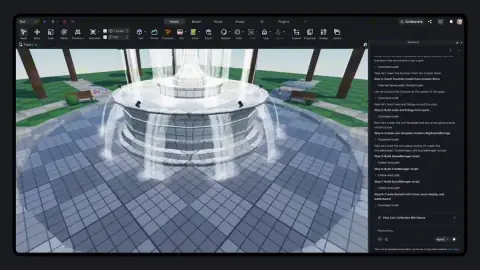
Reference to Game is an MIT-licensed skill and toolkit for coding agents such as Claude Code, Codex and Cursor, released by Gökay Aydoğan (gokayfem on GitHub) on November 8, 2026. It walks the agent through turning references (a screenshot, gameplay clip, asset sheet, 3D model, audio, link or plain written idea) into a playable game without losing the source's look: its style, colors, camera and UI.
According to the project's README, the agent first inspects the references and decides which one governs each aspect, such as looks, motion or mechanics. It then gets a single short scene looking right, puts it beside the reference, and corrects the most obvious difference before the game grows to more levels and assets. A Python command-line tool handles intake, color sampling, comparison images, implementation prompts and release checks. Optional fal workflows can generate new images, 3D models, textures, audio and music, with job tracking and estimated budgets.
The default output is a Three.js, TypeScript and Vite project. The README says the contracts are engine-neutral, but this release ships no verified generators for other engines. Four example games come with source, assets and comparisons; the author notes they were made before the skill was packaged and are not a benchmark.
The toolkit is free. fal charges for any generation you run, and the author is Head of Creative Engineering at fal, per his GitHub profile. It suits developers who already use a coding agent and care most about art direction. AIGamer has not tested it.
Limitation: Only the Three.js workflow ships verified project generators; the author says other engines can follow the workflow but are not supported out of the box, and the tools don't judge whether the result is faithful to the art
FAQ
Is Reference to Game free?
Yes. The toolkit code and docs are MIT-licensed. fal asset generation is optional and billed by fal, and the README says model pricing must be checked when used. The example games run without a fal key.
Which coding agents work with Reference to Game?
The README names Claude Code, Codex and Cursor. It installs as a Claude Code plugin or through npx skills add gokayfem/reference-to-game for agents that support the skills CLI.
Does Reference to Game work with Unity or Godot?
Not out of the box. The default stack is Three.js, TypeScript and Vite. The README says other engines can follow the workflow, but this release doesn't ship verified project generators for them.
Can I reuse the example game art?
Not under the MIT license. CREDITS.md says the example artwork, reference images, generated assets and audio are demonstration material outside the code's MIT grant.
Sources
Compiled by AIGamer from Reference to Game's own pages and the sources below, checked 19 November 2026. We haven't tested Reference to Game hands-on.
- Reference to Game: README (GitHub)
- Reference to Game: v0.1.0 release notes
- Reference to Game: Credits and licensing (CREDITS.md)
- Gökay Aydoğan: Reference to Game: Turning Visual References into Playable Worlds (blog post)
- GitHub: gokayfem profile
- GitHub: Repository metadata (API)
Image: Gökay Aydoğan / Reference to Game (GitHub)
Written in our own words; quotes are marked and credited. How we report