Home Resources Engine AI assistants
Roblox Studio Assistant
Roblox's built-in AI for scripting and building
- Best for
- Roblox creators, from first-timers to experienced developers, who want AI to plan, script and populate a game inside Studio
- Makes
- Roblox experiences: Luau scripts, objects, textured meshes, materials and procedural models
- Made by
- Roblox Corporation
- Where you use it
- Roblox Studio, Windows, macOS
- Engines
- Roblox
- Pricing
- Roblox Studio is free; Roblox's Assistant docs don't state a price (as of October 2026). You can also add your own Anthropic, OpenAI or Google API key
- Open source
- No
- Export
- No: games run on the Roblox platform. Generated meshes and scripts live in your Roblox place
- Status
- Available
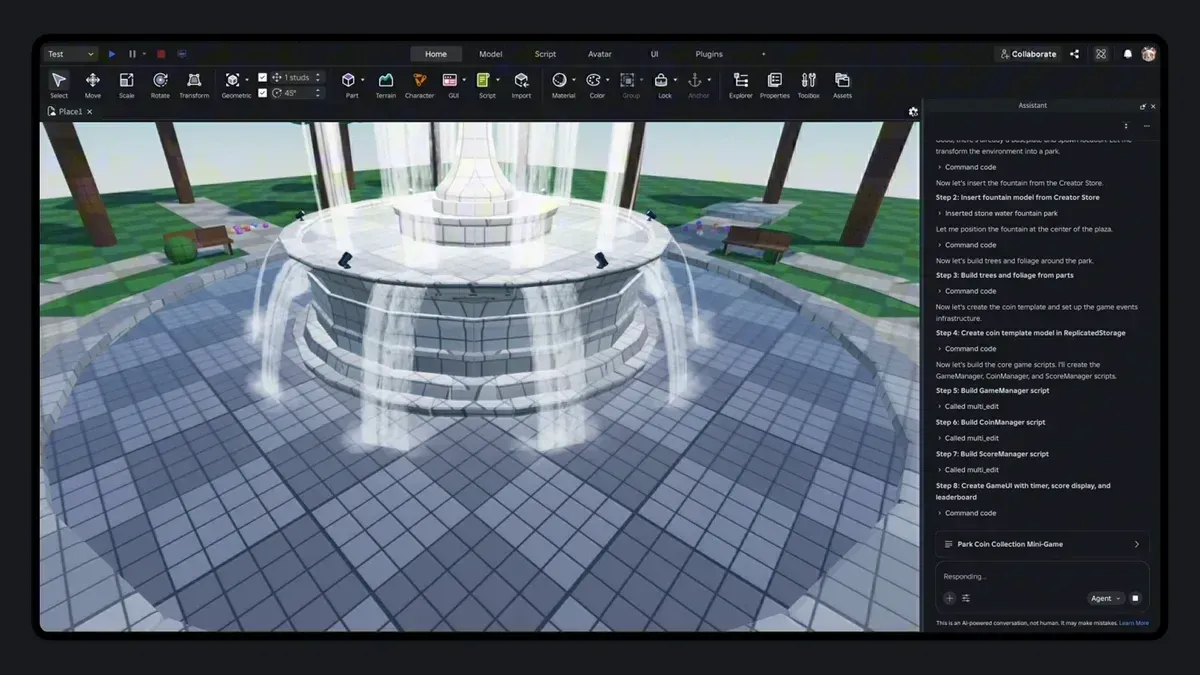
Assistant is the AI helper built into Roblox Studio, the free Roblox editor for Windows and Mac. According to Roblox's Assistant guide, it answers questions and acts directly on your game: it writes and edits Luau scripts, creates and changes objects, inserts assets from the Creator Store, and explains selected code.
It also generates content. The /generate_mesh command makes a textured 3D mesh from text or an image, materials can restyle parts, and procedural models are capped at 50 in a rolling 24 hours. Planning Mode turns a request into an editable plan that runs only when you click Build. In an April 15, 2026 newsroom post, Roblox engineering SVP Nick Tornow announced a playtesting agent in beta that tests the game against the plan, and said 44% of Roblox's top 1,000 creators used Assistant or third-party AI tools through MCP between March 6 and April 7, 2026.
Studio also has a built-in MCP server (MCP is a standard that lets AI agents call an application's tools). Roblox's docs show clients such as Claude Code, Cursor, Codex CLI and Gemini CLI reading scripts, running Luau, generating meshes and starting playtests. An older standalone MCP server on Roblox's GitHub (MIT) is no longer actively developed; its README recommends the built-in one. Inside Assistant you can also add your own Anthropic, OpenAI or Google API key.
Roblox's docs don't state a price for Assistant. Everything you build stays on Roblox. AIGamer hasn't tested it.
Limitation: Your game lives on Roblox and nowhere else, and procedural model generation is capped at 50 models in a rolling 24-hour window.
FAQ
Does Roblox Studio have AI?
Yes. Assistant is built into Studio. It writes and edits scripts, builds objects, generates meshes and materials and plans games, and a playtesting agent is in beta, per Roblox's docs and newsroom.
Is Roblox Assistant free?
Roblox Studio is free, and Roblox's Assistant docs don't list a price. Procedural model generation is limited to 50 models in a rolling 24 hours.
Does Roblox Studio have an MCP server?
Yes. Studio has a built-in MCP server that runs locally, so tools like Claude Code, Cursor and Codex can read and edit your game, run Luau and start playtests. Roblox's older open-source server on GitHub is no longer actively developed.
Can I use Claude or GPT inside Roblox Assistant?
Yes. Roblox's AI docs say you can open Assistant's Manage API Keys menu and set up a model from Anthropic, OpenAI or Google with your own key.
Sources
Compiled by AIGamer from Roblox Studio Assistant's own pages and the sources below, checked 29 October 2026. We haven't tested Roblox Studio Assistant hands-on.
- Roblox Creator Hub: Assistant for Studio
- Roblox Creator Hub: Build your first game with Assistant
- Roblox Creator Hub: Connect to the Roblox Studio MCP server
- Roblox Creator Hub: AI on Roblox
- Roblox Creator Hub: Studio setup
- Roblox Newsroom (Nick Tornow): Roblox Studio is Going Agentic
- GitHub (Roblox): Roblox/studio-rust-mcp-server (archived)
Image: Roblox
Written in our own words; quotes are marked and credited. How we report